Sales Performance & Coaching Platform for Loan Officers
Go! Coaching is a sales performance platform built for loan officers — replacing 6 disconnected spreadsheets and a failed CRM with a single connected system where coaches can track student progress in real time and every logged activity updates the rest of the platform automatically.
- Date
- Q2 2025
- Role
- Product Designer
- Scope
- UX Research, Product Strategy, UX/UI Design, Design System, Prototyping
- Team
- Product, Engineering, Coaches (Stakeholders)
- Tools
- Figma, Figjam, Jira
- Status
- Productive

01 — The Problem
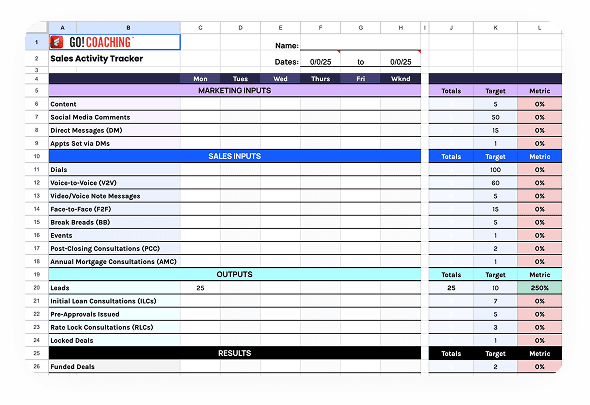
Loan officers in the Go! Coaching program were running their entire sales operation across 6 separate spreadsheets: a Relationship Tracker that internally managed five categories of contacts (Target 300 Realtors, Focus 50 RLTRs, Focus 50 COI, Focus 50 VIP, and Focus 50 Clients), plus an Activity Tracker, Lead Tracker, Loan Tracker, Closing Deals tracker, and Commissions Tracker. Each one had its own logic, its own structure, and no connection to any of the others. Data that should have flowed automatically had to be copied by hand — every time, by every user.
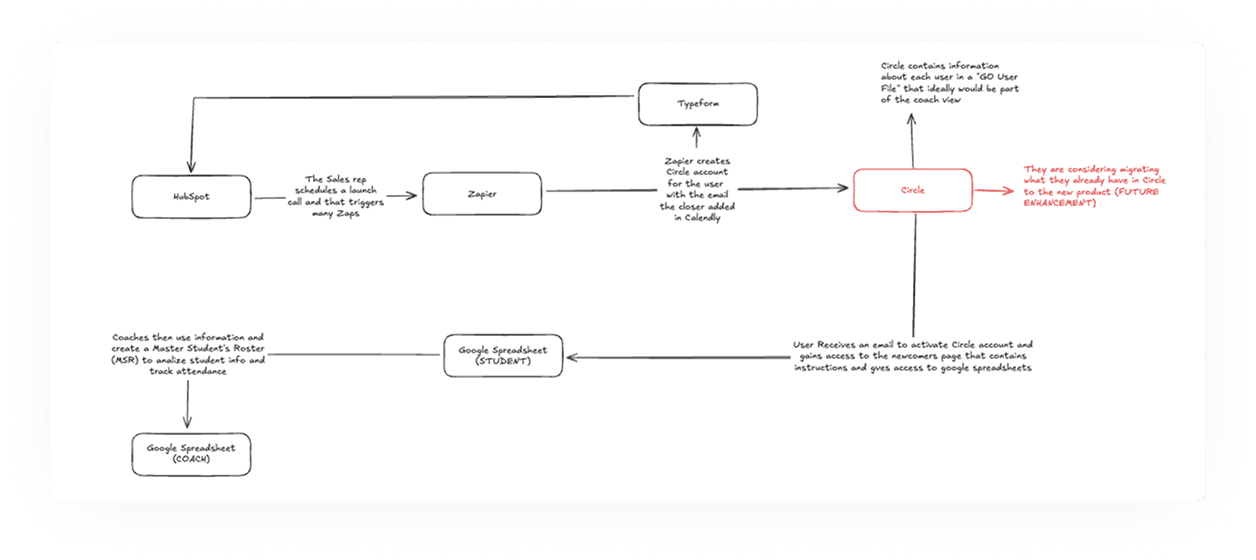
Beyond the spreadsheets, the existing ecosystem was already complex: HubSpot feeding into Zapier, Zapier triggering Circle account creation, students receiving access to their spreadsheets via email, coaches manually building Master Student Rosters from that data. Every new student meant a cascade of manual steps across multiple tools.
The team had already tried SalesScreen — one of the leading SPM tools in the market. They abandoned it. The customization was too limited for their methodology, and the data presentation was overwhelming and poorly organized. The coaches didn’t need more data. They needed the right data, structured around the way they actually coached.
The ask was to build a platform. But the real problem was deeper: how do you replace 6 spreadsheets, a failed CRM, and a patchwork of automation tools — without losing the methodology that made the coaching program work?
02 — Discovery & Research
Before opening Figma, I needed to understand how the system actually worked.
Long conversations before any wireframe existed.
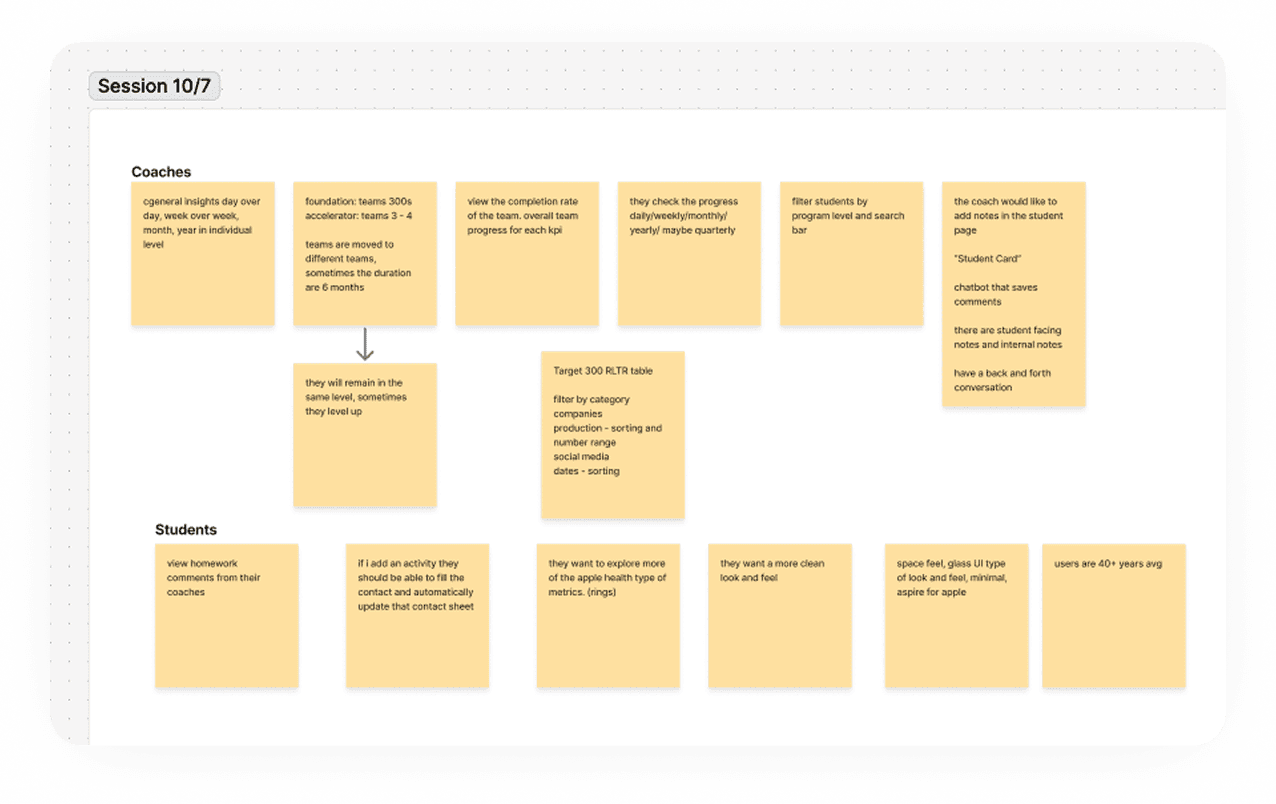
Understanding the platform required extended sessions with the client and coaches — spreadsheet by spreadsheet, field by field, asking what fed into what and why. They knew their methodology deeply. But translating it from isolated files into a connected product was a completely different challenge. In a spreadsheet, each tracker lives on its own. In a product, every action has consequences somewhere else. We needed to be crystal clear on the data logic before touching the design — because getting it wrong here would have broken everything downstream.
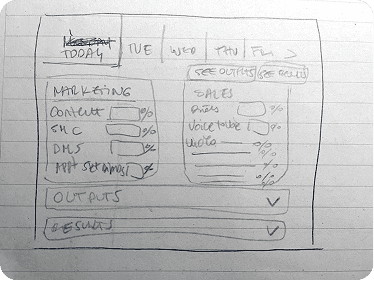
The insight that changed everything came from reading the spreadsheets themselves.
The existing Activity Tracker wasn’t just a log — it was a cascade of calculations. Marketing Inputs fed into Sales Inputs, which produced Outputs, which drove Results. Each section was color-coded, each row had a Target and a live Metric percentage. The logic was solid — but entirely implicit, encoded in cell formulas and column order, invisible to anyone who hadn’t built it themselves. A new loan officer opening this for the first time just saw rows. The methodology was buried under the mechanics of a spreadsheet that was never designed to teach anyone anything.
That became the core design challenge: preserve the cascade logic, but make it legible.
The product also had to work across four distinct user profiles — not just roles, but levels of experience and business maturity:
→ Level 1 (Foundations): new loan officers, 0–3 deals/month, building structure and rhythm from scratch
→ Level 2 (Accelerator): 4–7 deals/month, establishing repeatable sales systems
→ Level 3 (Elite): 8+ deals/month, focused on team leadership and scaling
→ Level 4 (Peak+): sales leaders building and recruiting teams
Each level had different goals, different coaching needs, and a different relationship to the data. Designing one platform that served all four without feeling generic for any of them was a structural challenge that started in research, not in UI.
I also reviewed existing SPM tools like SalesScreen and CRMs like HubSpot. The conclusion: too generic for this methodology, or too complex for a coaching relationship. Building from scratch was the right call.
Working within a 13-week delivery cycle — development starting at week 4, prototypes delivered every two weeks — meant every research input had to turn into a concrete design direction within days, not weeks.
03 — Product Strategy
Replicating spreadsheets was the wrong goal.
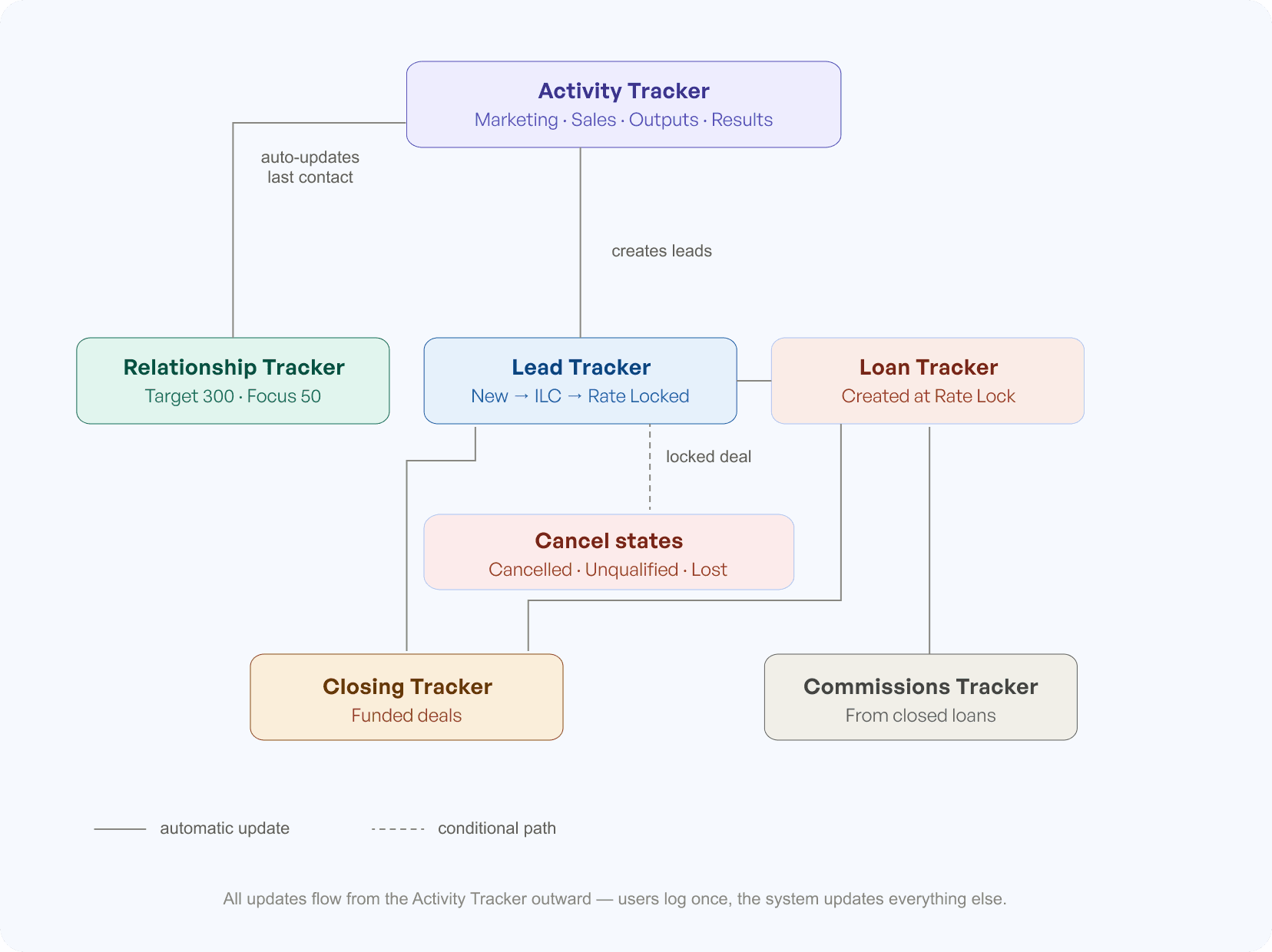
The real opportunity wasn’t digitization — it was connection. The platform’s core value proposition was that actions in one part of the system would automatically update everything else. Tag a referral partner in a Sales activity, and their last contact date updates instantly. Log a new lead as an Output, and it appears in the Lead Tracker already linked to its source. Lock a deal, and a loan gets created automatically. Users log once — the system does the rest. That was impossible in a spreadsheet. It became the reason to build the product at all.
A gradual exit from spreadsheet thinking.
The coaches and loan officers knew the spreadsheet structure inside out — and that familiarity was an asset, not something to eliminate. Rather than forcing a complete mental shift on day one, I designed the transition deliberately: some table-based views survived, column structures were preserved where they aided recognition, and new interactions were layered on top of familiar patterns. The goal wasn’t to make the product feel nothing like a spreadsheet. It was to make it feel like a better version of one — until users naturally stopped thinking in spreadsheet terms at all.
The Activity Tracker — the daily operating system.
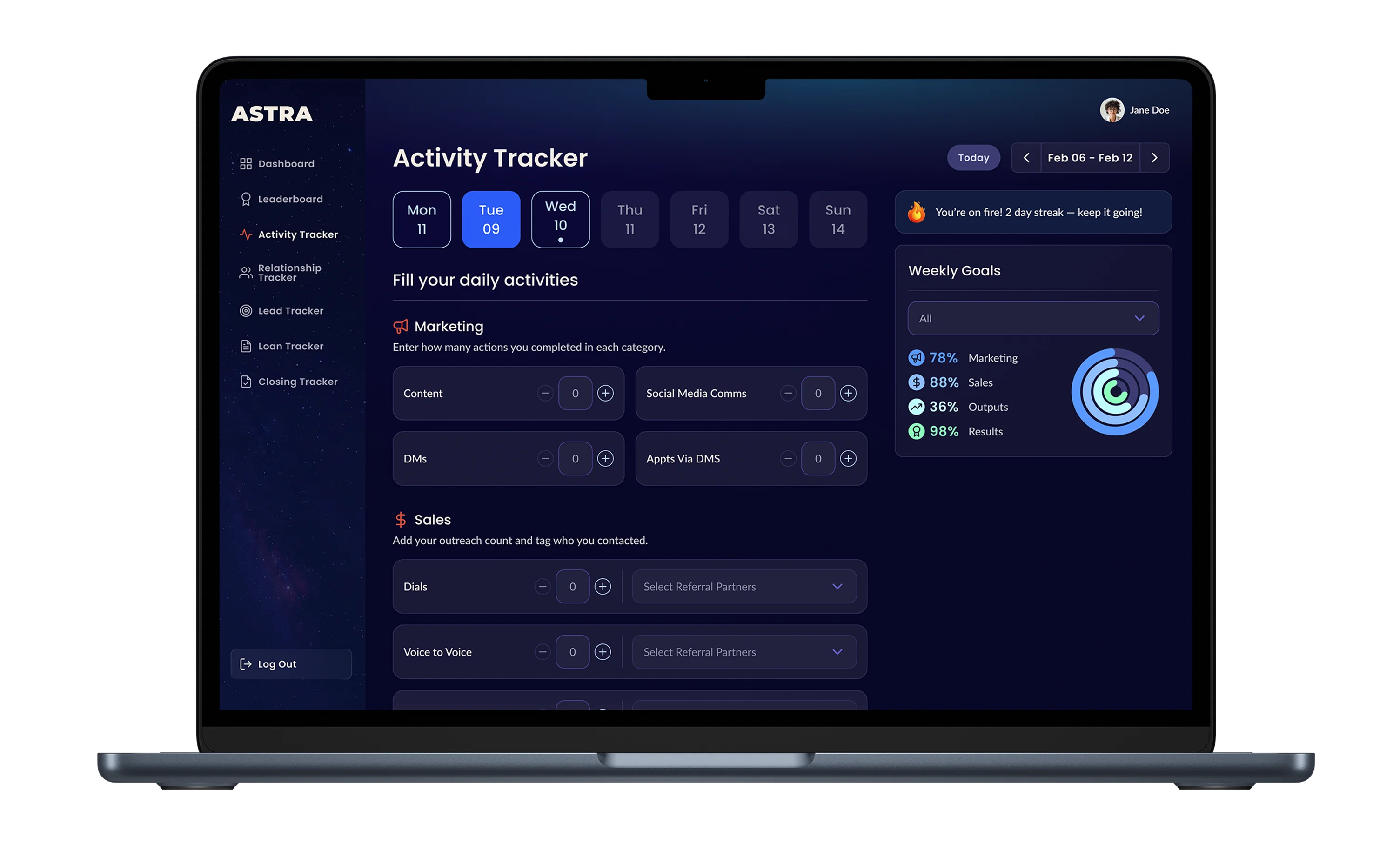
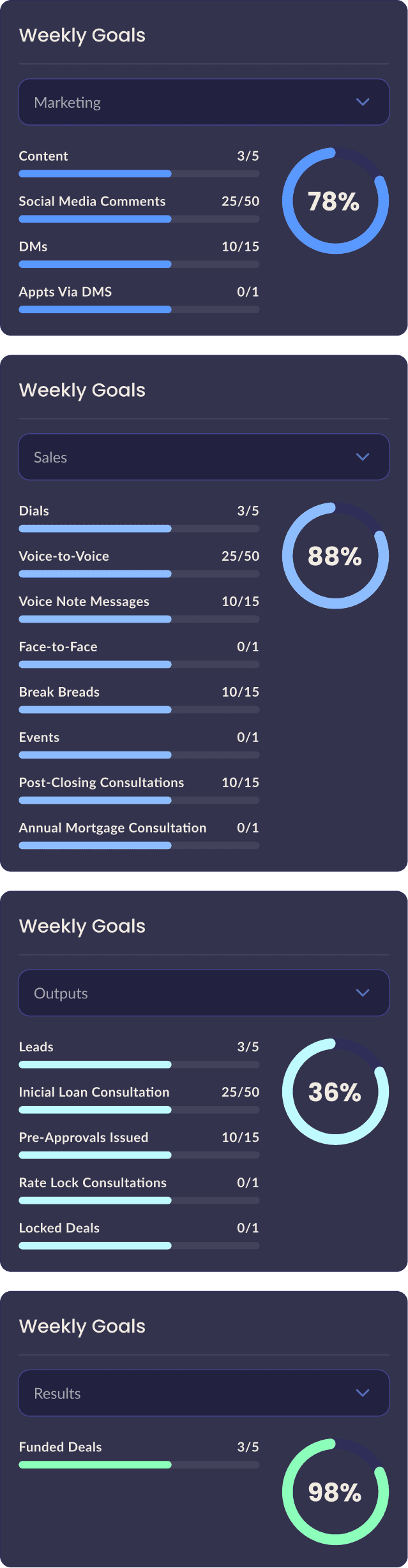
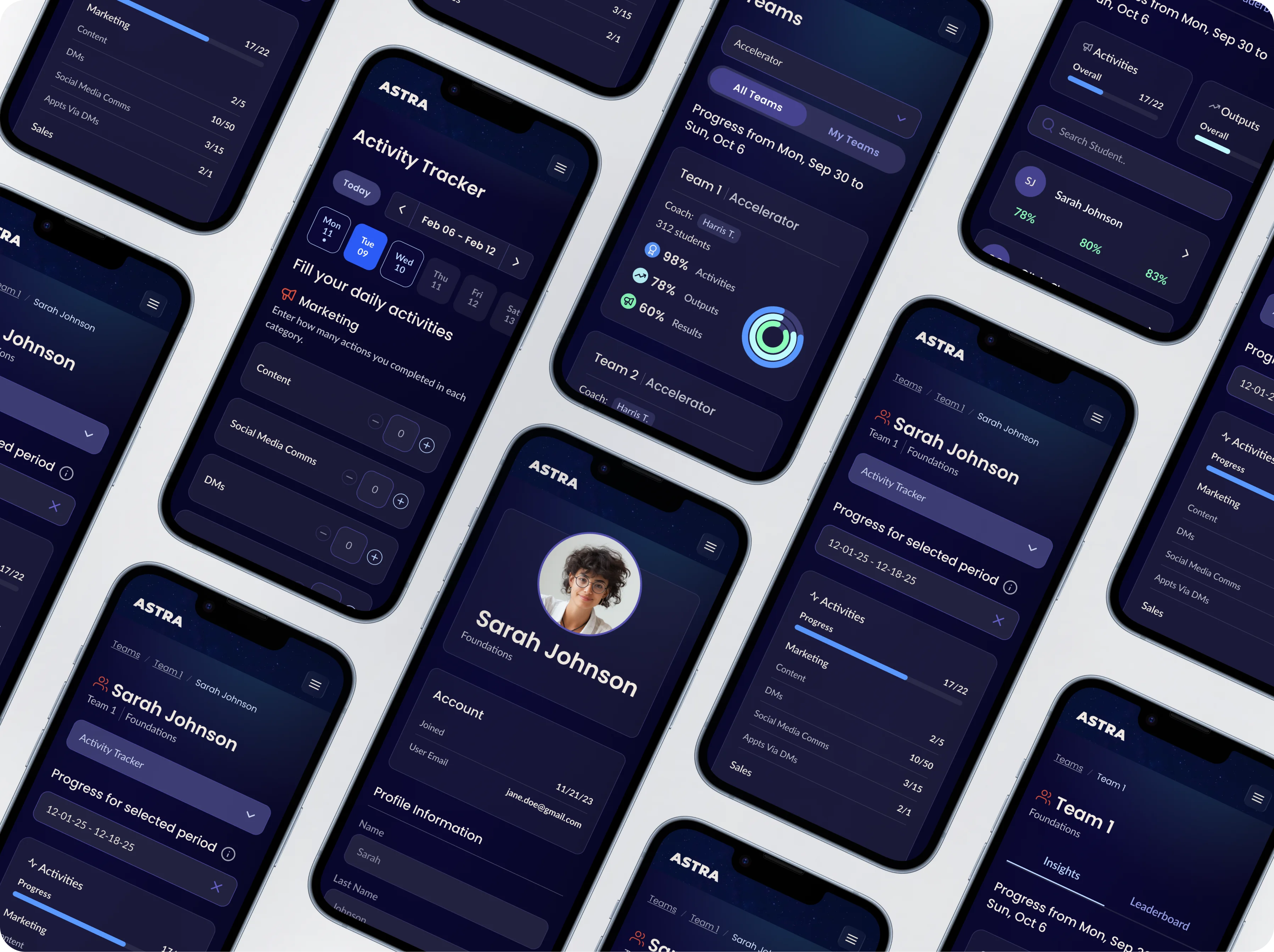
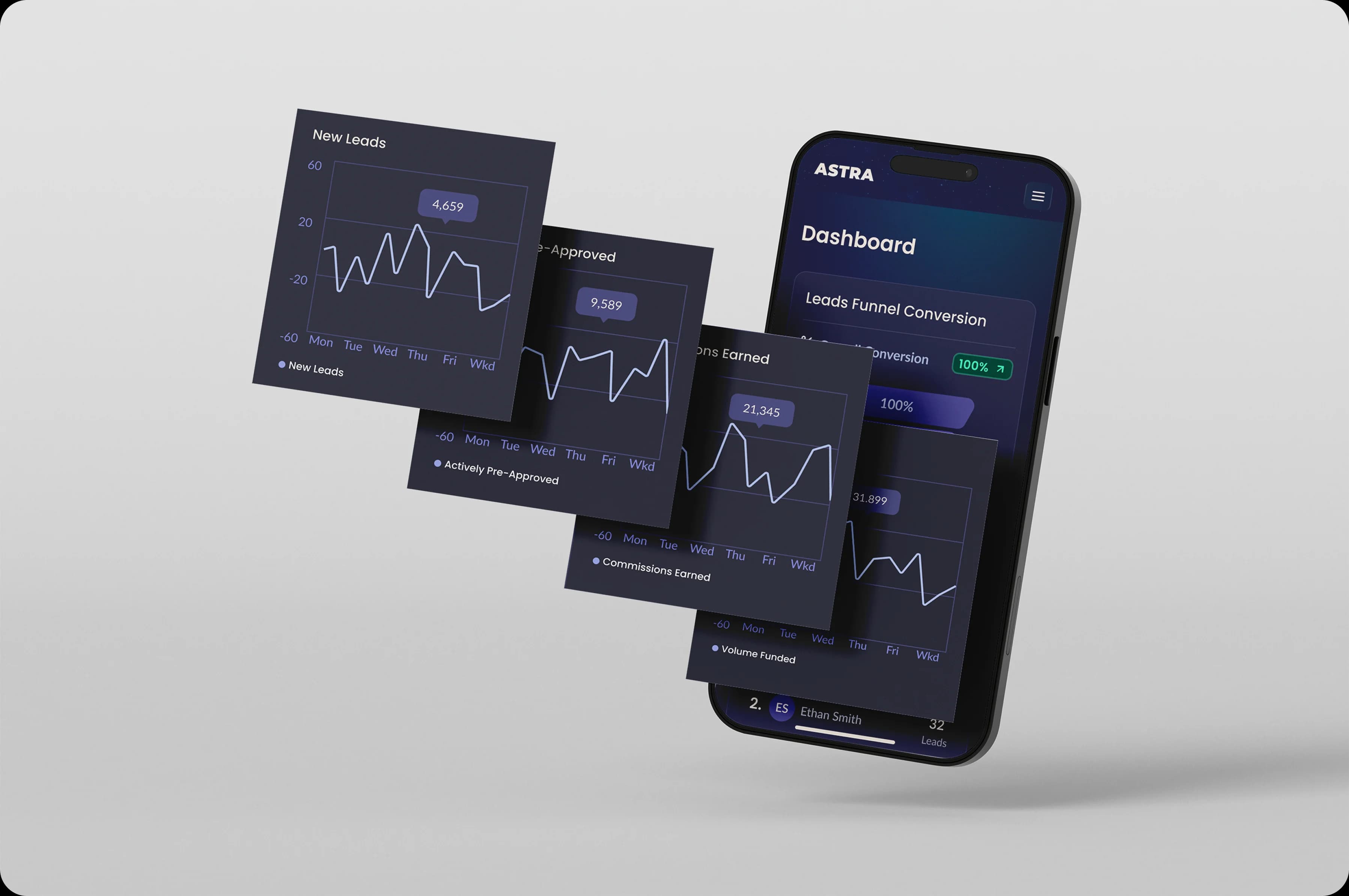
The cascade logic of the original spreadsheet — Marketing → Sales → Outputs → Results — became the structure of the Activity Tracker, but made visible and legible instead of hidden in cell formulas. Numeric inputs keep daily logging fast. Direct tagging of referral partners triggers automatic updates to last contact dates across the Relationship Tracker. The weekly progress visualization lives in a persistent panel so users always know where they stand without leaving the page. The streak indicator — small, unobtrusive — was the first gamification hook, present from day one.


Mobile first, with a companion app in mind.
Despite being a web app, I designed every screen mobile first. Loan officers are rarely at a desk when they need to log an activity or check a referral. Designing for the smallest screen forced better prioritization — if something didn’t deserve space on mobile, it probably didn’t deserve space at all. The web experience expanded from those constraints, not the other way around. And it positioned the product for a natural next step: a dedicated mobile companion app down the line.
04 — Visual Direction
Choosing an aesthetic that felt like the product.
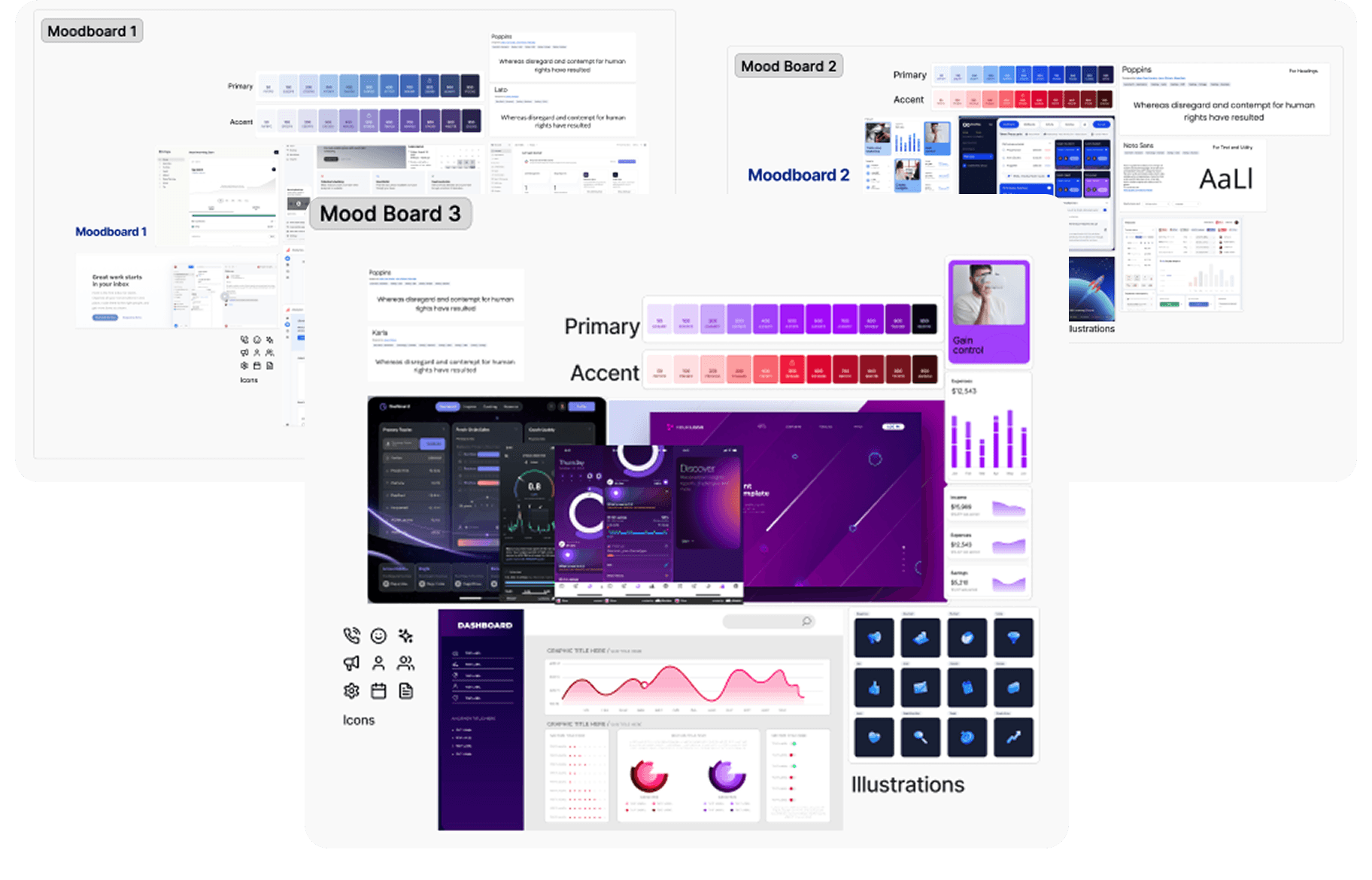
Before any UI work started, I put together three moodboard directions for the client to evaluate. The goal wasn’t to pick a color palette — it was to align on the emotional register of the product. A performance platform for competitive loan officers needs to feel different from a generic SaaS dashboard.
They chose the spatial, high-contrast direction: dark backgrounds, glowing data visualizations, a sense of precision and ambition. It matched the competitive culture of the program and the aspirational identity of the users — people who track their numbers because they want to win.
05 — The Solution
The platform was designed around two distinct experiences:
The Student Experience
Everything a loan officer needs to manage their day-to-day: the Activity Tracker, lead and loan management, the Relationship Tracker, their profile, dashboard, and leaderboard. All of it designed to help them log fast, stay accountable, and see their own progress clearly.
Automatic updates as the core product promise.
Every design decision in the Activity Tracker was evaluated against one question: does this make the automatic update trustworthy and understandable? If a number changes and the user doesn’t understand why, the feature backfires. Designing the logic of automation was as important as designing the interface around it.
The hardest design problem: leads and loans.
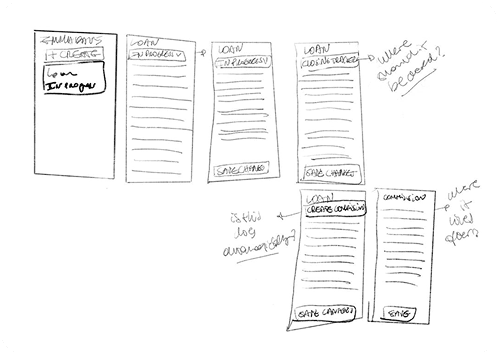
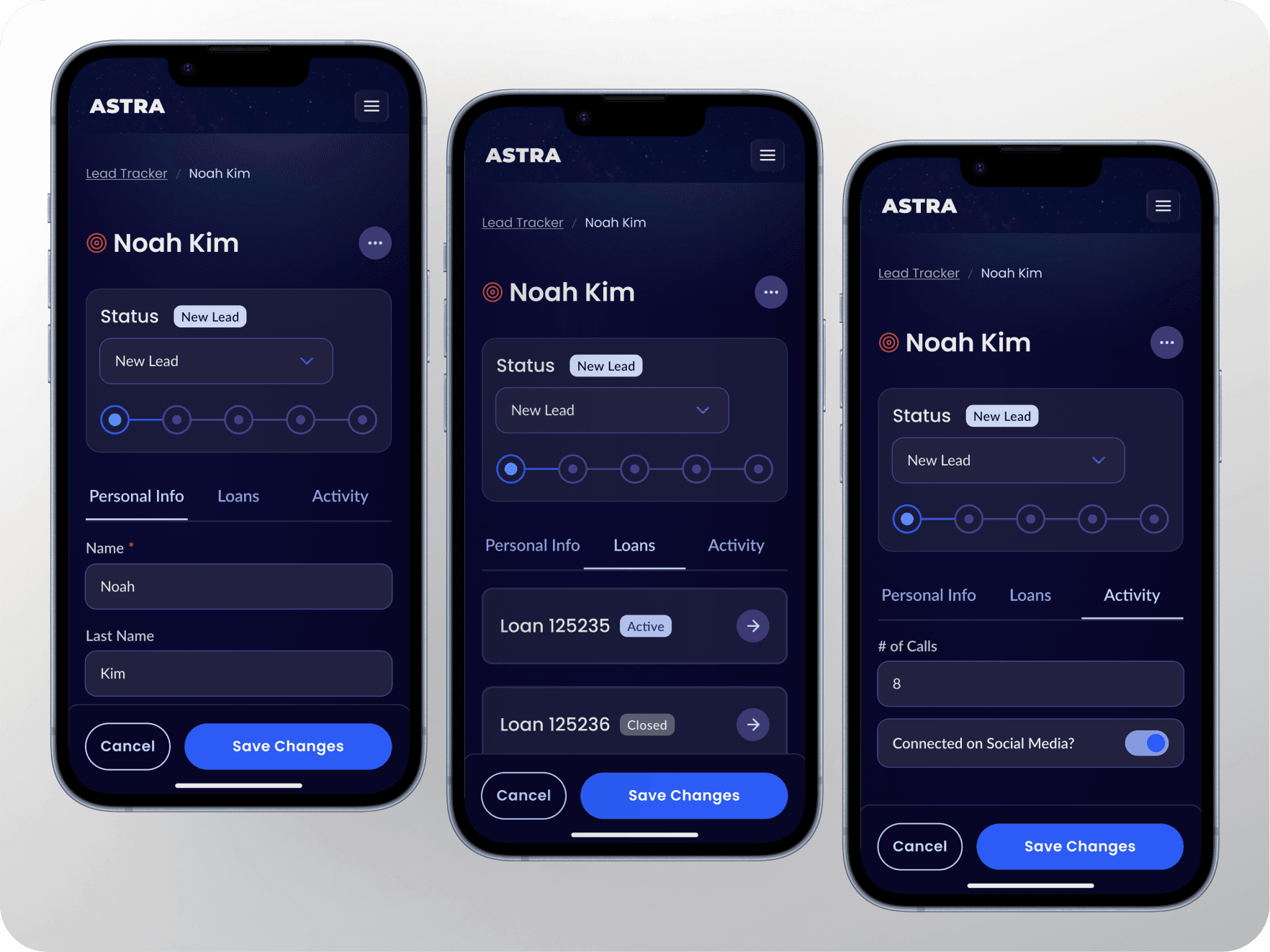
The most complex experience wasn’t the Activity Tracker — it was understanding how leads and loans actually worked and how to show their relationship in the product. A lead is a potential deal in progress. A loan is a committed transaction with its own lifecycle. A loan doesn’t exist until a lead reaches a specific threshold — a locked deal. From that point, the loan has its own record, its own update cycle, and its own tracking completely separate from the lead that originated it.
Cancel states (Cancelled, Unqualified, Different Lender) were handled separately to keep the active pipeline clean and give coaches meaningful data about why deals didn’t close — not just that they didn’t. Collapsing leads and loans into a single view would’ve simplified the interface but destroyed the data integrity that makes coaching conversations useful.
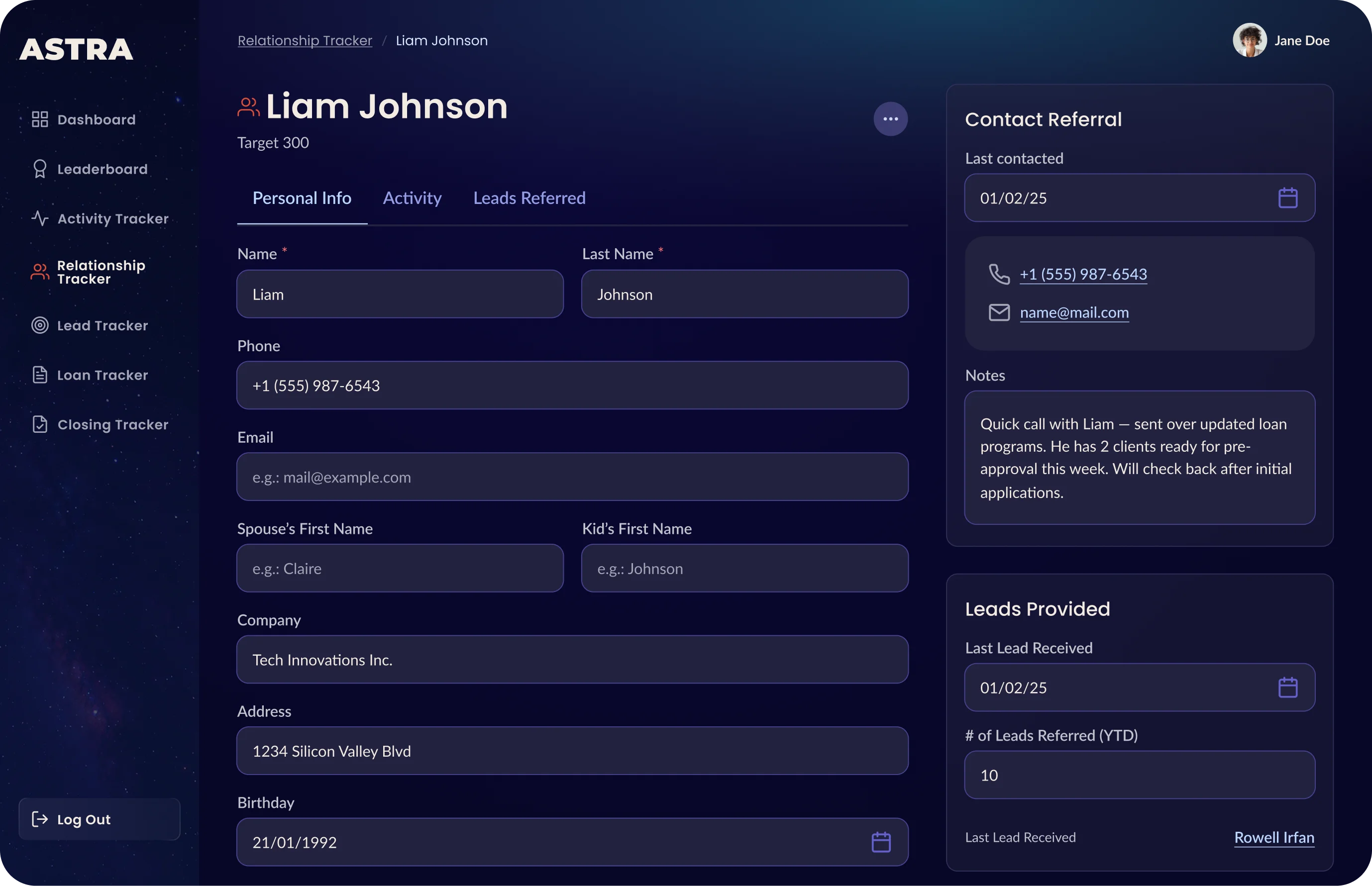
The Relationship Tracker as an emotional CRM.
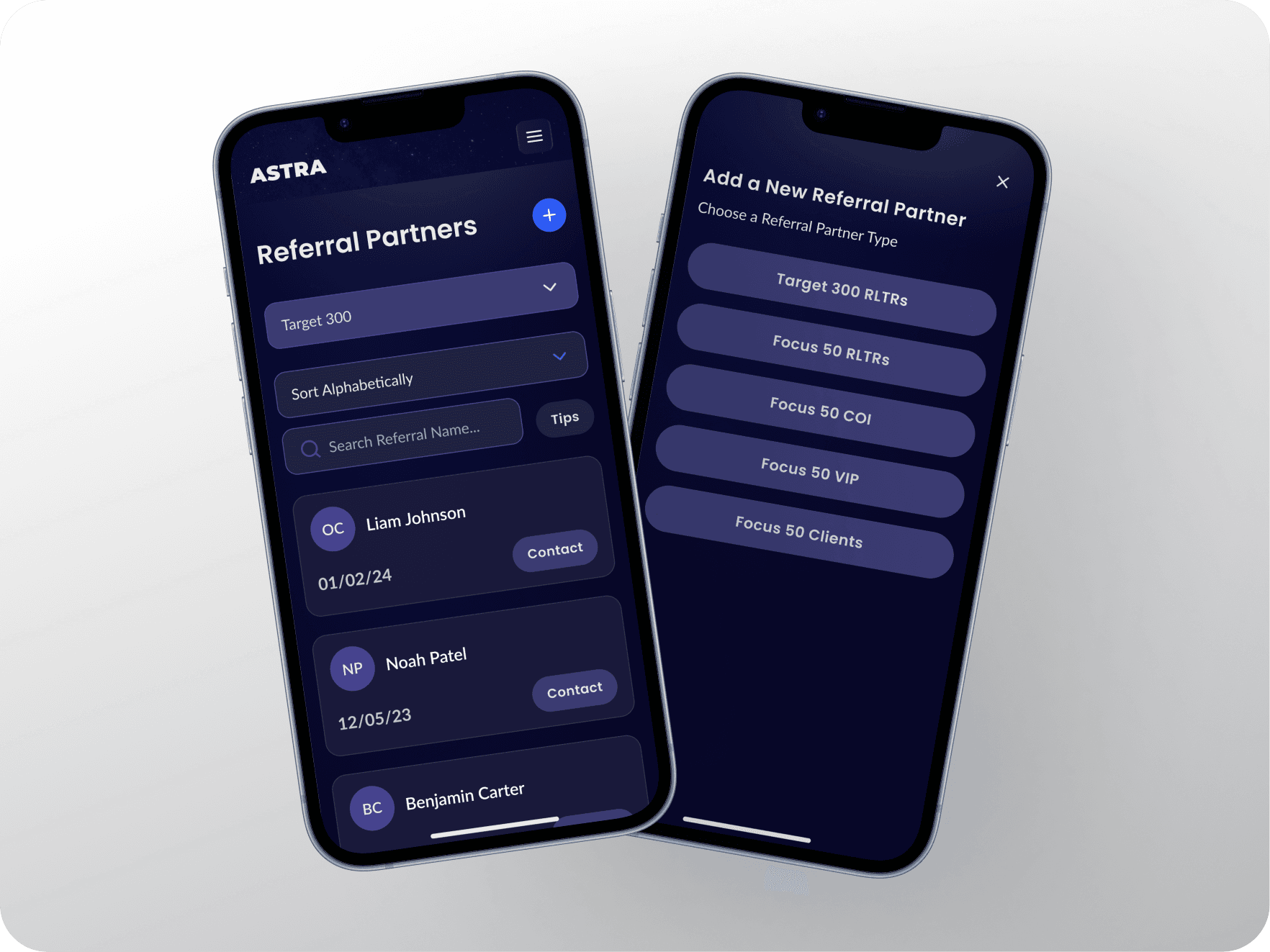
Beyond contact details and performance metrics, the referral partner profile captures spouse name, kids’ names, hobbies, and a “what’s important for this person” field. In the mortgage business, relationships are the pipeline. Designing space for that information was a way of encoding the coaching methodology into the product itself.
Guardrails, not just inputs.
Preventing retroactive data manipulation was one of the least visible but most important decisions. In an accountability product, the integrity of historical data is what makes coaching conversations meaningful. Building guardrails wasn’t a technical constraint — it was a product principle.
Persistent context panel.
In both Lead detail and Referral Partner detail views, key contact information lives in a fixed right panel outside the editable form. The context stays visible. The form stays focused. Two different jobs that shouldn’t compete for the same space.
Gamification as a layer, not a feature.
Coaches wanted motivation hooks. Engineering wanted an MVP. I designed the gamification system — leaderboards, streaks, weekly progress visualization — as optional layers that could be activated progressively, without blocking the core product from shipping. This wasn’t a compromise. It was the right architecture: prove the core loop first, add motivation mechanics once the behavior is established.
The Coach Experience
A completely separate set of views — different design, different information hierarchy — built entirely around one job: tracking and supporting student progress.
The Coach View — designed for the conversation, not the spreadsheet.
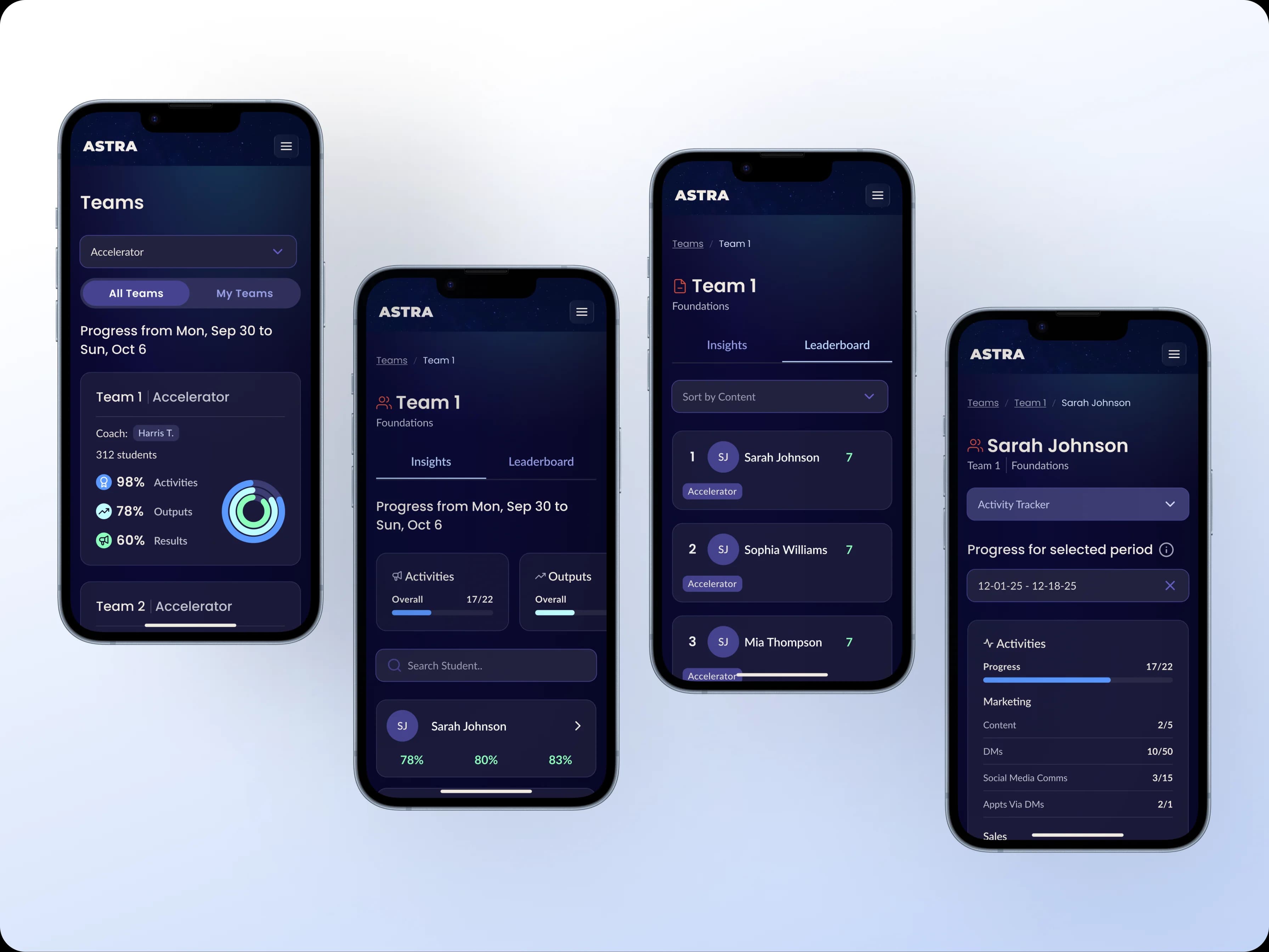
The coach experience was built around preparing for a weekly accountability call. From their view, a coach can see at a glance how each student is tracking against their weekly targets, when they last logged data, what their call pick-up rate is, and what action steps are still open from the previous session.
The most important design decision here was showing not just where a student stands, but whether they’re moving in the right direction. A student at 60% of their weekly goal on Thursday tells a different story than a student at 60% on Monday. The coach view was built to surface that distinction without the coach having to do the math themselves.
Coach experience designed around weekly thinking.
Coaches don’t think in individual days — they think in weeks. Every coach view was built around that mental model: weekly snapshots, temporal context always visible, team and individual breakdowns that made it easy to spot who needed attention without micromanaging. Coaches can also view the leaderboard across all their students, filter by level — Foundations, Accelerator, Elite, Peak+ — and see at a glance who’s excelling and who needs a more focused conversation that week.
06 — Closing
What’s next.
The 2026 roadmap reflects a product that’s proven its core and is ready to grow: a Student Dashboard, migration of existing users from Circle, an enhanced Leaderboard, and expanded search and filtering across all views. The mobile companion app — designed for from the beginning through the mobile-first approach — is the natural next milestone. The data model, component architecture, and permission structure the MVP established make all of it buildable without starting from scratch.
The MVP shipped as a functional replacement for 6 spreadsheets and a failed CRM — consolidated into a single platform with a shared data model, automatic cross-system updates, real-time visibility for coaches, and a daily logging experience designed around the habits the methodology depends on. A product that replaced a system the team had already failed to replace once before, built in 13 weeks, actively growing into 2026.
What I learned:
Spreadsheets are design artifacts. Every column, every workaround, every manual copy-paste is a user telling you something about what they need. I learned to read them like research data, not just as things to replace.
Transitions matter as much as destinations. Designing the gradual exit from spreadsheet thinking. Users need to recognize enough of the old system to trust the new one.
The hardest UX problems are often data problems in disguise. The lead/loan relationship looked like a UI challenge on the surface. Underneath, it was a question about data ownership and lifecycle boundaries. Solving the data model first made the UI obvious.
Mobile first forces better decisions. Every element that didn’t earn its place on mobile didn’t earn its place anywhere. The constraint made the product sharper.
In competitive products, motivation is part of the experience. The leaderboard and streak weren’t features bolted on at the end — they were in the product thinking from day one. Designing for performance means designing for the emotional experience of performance, not just the functional tracking of it.
Define success metrics before the first wireframe. Not having post-launch data isn’t just a measurement gap — it’s a product gap. Knowing what you’re optimizing for changes the decisions you make during design, not just after launch.
Thank you for reading!
Go Back